Pen Pattern Wrap Mockup for Clear Design Presentations
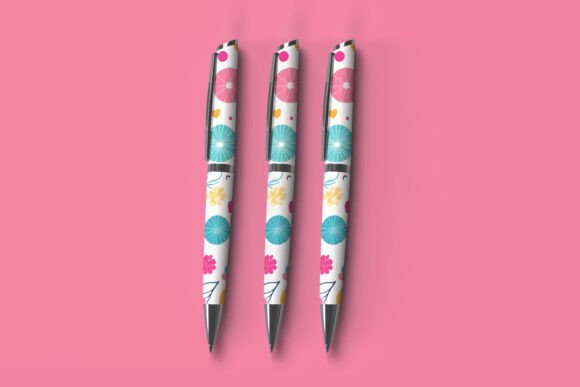
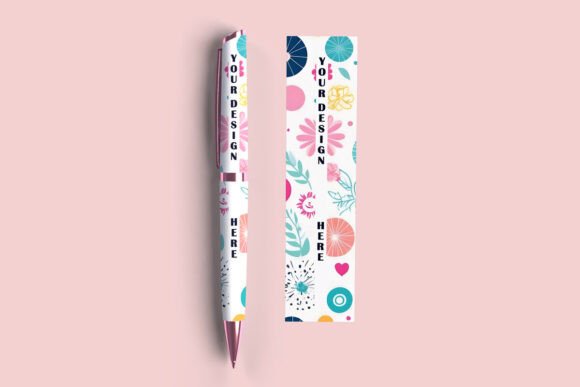
When you need to show a pen design, a logo placement, or a custom print pattern in a realistic setting, a Pen Pattern Wrap Mockup offers a straightforward way to communicate your vision. Instead of describing how a pattern will look wrapped around a cylindrical surface, you can show it directly. This type of mockup places your artwork onto a pen body, complete with lighting, shadows, and perspective, so the viewer sees a finished product rather than a flat design file.
What a Pen Pattern Wrap Mockup Does for Your Workflow
Creating product visuals from scratch takes time. You might need to build a 3D model, set up lighting, render multiple angles, and then composite everything together. A Pen Pattern Wrap Mockup simplifies that process. It provides a pre-built scene where you insert your pattern into a smart layer, and the mockup handles the rest. The wrap effect aligns with the pen shape, so your design curves naturally around the barrel, cap, or clip without manual adjustment.
This matters most when you work under deadlines or produce multiple variations. Whether you design branded merchandise, promotional giveaways, or a retail pen line, being able to swap patterns quickly lets you focus on refining the artwork rather than rebuilding the presentation each time.
Presenting Patterns with Realism and Context
A flat pattern file rarely conveys how a design will look once printed on a curved object. Colors shift, lines distort, and scale becomes difficult to judge. The Pen Pattern Wrap Mockup addresses this by mapping your artwork onto a three-dimensional surface. Your pattern follows the contour of the pen, which helps clients, stakeholders, or production teams understand the final appearance before any physical sample exists.
For example, a graphic designer working with a client on a limited-edition pen set can present several pattern options side by side. Each mockup shows the pattern wrapped around the pen, including reflections that affect how bright or muted colors appear in different lighting conditions. This level of detail supports better decisions early in the project, reducing the need for costly revisions later.
Who Benefits Most from This Type of Mockup
Several groups find the Pen Pattern Wrap Mockup especially useful in their daily work.
Product Designers and Industrial Designers
If you create physical products, presenting a concept to a manufacturer or client requires accurate visuals. A mockup that wraps a pattern around a pen helps you validate proportions, color placement, and print registration. You can test how a geometric pattern behaves around a tapered barrel or how a gradient aligns with the clip area. This reduces guesswork before tooling or sampling begins.
Brand Managers and Marketing Teams
Pens are common promotional items. When planning a campaign, you may need to show partners how a logo or tagline will appear on branded merchandise. Using a Pen Pattern Wrap Mockup, you can generate visuals for multiple pen colors, pattern styles, or finishes without ordering dozens of prototypes. This speeds up internal approvals and helps external partners visualize the final giveaway.
Freelancers and Small Business Owners
If you run a small creative studio or sell custom pen designs, you need portfolio images that look professional. A mockup allows you to produce polished product shots without hiring a photographer or renting studio equipment. You can build a consistent product catalog where every pen appears in the same lighting and angle, which strengthens your brand identity and saves production costs.
Online Sellers and E-Commerce Entrepreneurs
Product listing pages benefit from realistic imagery. A Pen Pattern Wrap Mockup helps you create visuals that show the pen from multiple views, with your pattern wrapped clearly around the body. This can improve click-through rates and reduce returns because customers see exactly what the printed pattern looks like before purchasing. Even if you sell handmade or small-batch pens, a mockup gives you a clean, professional look that competes with larger retailers.
Practical Benefits Beyond Appearance
The value of a Pen Pattern Wrap Mockup goes beyond how the design looks. It also affects your workflow, communication, and decision-making.
Faster Iteration and Experimentation
When you can update a mockup in seconds, you feel more willing to explore different pattern directions. You might try a striped layout, a camouflage print, or an abstract watercolor effect, all within the same pen shape. This freedom encourages creative exploration because the cost of generating a new version is low. You can compare options side by side and choose the direction that works best for your audience or project goal.
Clearer Communication with Non-Design Stakeholders
Not everyone reads design files easily. A client may struggle to imagine how a floral pattern wraps around a pen from a flat Illustrator file. The Pen Pattern Wrap Mockup removes that barrier. It shows the pattern already applied, in context, so conversations shift from “how will it look” to “which version do we prefer.” This saves time in meetings and reduces misunderstandings that can delay production.
Better Alignment with Production Realities
Mockups that respect physical constraints help you avoid creating designs that cannot be printed accurately. Many Pen Pattern Wrap Mockups use realistic surface textures, ink absorption levels, and specular highlights. If your pattern includes very fine lines or low-contrast colors, the mockup may reveal legibility issues before you send files to the printer. This foresight helps you adjust your artwork to fit the intended printing method, whether that is pad printing, screen printing, or digital transfer.
Limitations and Fit Considerations
While a Pen Pattern Wrap Mockup is a powerful tool, it has boundaries worth understanding. The mockup simulates a specific pen model, shape, and lighting setup. If your final product uses a different pen body or material, the mockup may not represent the exact outcome. Always treat mockup visuals as approximations rather than guarantees.
Also, some mockups may not allow full control over every detail, such as clip color, nib type, or surface texture. Before committing to a mockup for a critical presentation, verify that the included customization options match your needs. In situations where absolute accuracy is required, such as a final approval before mass production, combining a mockup with a physical sample remains the best approach.
Finally, pattern complexity can affect the mockup result. Very intricate patterns with high-frequency details may alias or moiré when mapped onto a curved surface. If your pattern includes tight repeating elements, test it in the mockup early to see how it resolves. You may need to adjust the scale or simplify some areas to maintain clarity.
How to Choose the Right Pen Pattern Wrap Mockup
Selecting a mockup that fits your project depends on a few factors. Consider the pen shape and size first. A mockup designed for a standard ballpoint may not work for a fountain pen or a chunky promotional pen. Look for mockups that match your intended pen silhouette to avoid misleading perspectives.
Next, evaluate the smart object layer quality. Some mockups use well-masked layers that keep your pattern crisp while others may introduce blur or color shift at the edges. Read reviews or check sample outputs if possible. High-resolution mockups with organized layer structures save time and produce cleaner results.
Also think about the number of views you need. A single-angle mockup may suffice for a simple portfolio image, but a product listing or catalog often benefits from multiple angles. Some Pen Pattern Wrap Mockup sets include front, back, top, and isometric views within one file, allowing you to generate a complete set of images without reassembling the scene manually.
Making the Most of Your Mockup in Practice
To get good results, prepare your pattern file at the recommended resolution and size specified in the mockup instructions. Using a higher resolution than needed may slow down your software without improving quality, while a low-resolution file can appear pixelated. Stick to the guidelines provided by the mockup creator whenever possible.
Consider creating a few pattern variations that test different color schemes, orientation angles, and repeat sizes. This gives you comparison material for client reviews or internal selection. Label each version clearly so you can track feedback and revisions.
If you present multiple pens together, maintain consistent lighting and background across all mockups. This creates a cohesive look in your portfolio or product page. Small adjustments to brightness or contrast between mockups can make the set appear less professional, so use the same mockup template for every variant when you can.
Real-World Applications Across Industries
An educator developing custom pens for a school fundraising campaign can use a Pen Pattern Wrap Mockup to show the school mascot pattern on a pen before ordering a bulk quantity. The mockup helps confirm that the mascot colors reproduce well on a small cylindrical surface.
A blogger who sells branded merchandise can create mockup images for social media posts, allowing followers to see how the pen looks with a signature pattern before the product launches. This builds anticipation and gives the audience a realistic preview that flat graphics cannot provide.
A small business owner printing pens as client gifts can use mockups to show recipients the option between a geometric pattern and a minimalist logo wrap. Sharing these visuals via email helps recipients choose their preferred style, making the gift feel personalized and thoughtful.
In each case, the mockup acts as a bridge between the designer’s screen and the real world. It reduces uncertainty, supports informed choices, and helps projects move forward with confidence.
Final Thoughts on Using Pen Pattern Wrap Mockups
Integrating a Pen Pattern Wrap Mockup into your workflow changes how you present, evaluate, and refine pen designs. It takes the guesswork out of visualizing patterns on curved surfaces and gives you a reliable way to communicate your ideas to others. Whether you work alone or as part of a team, this tool can save time, improve the quality of your presentations, and help you produce designs that translate well to physical production.
Approach your mockup as a guide, not a promise of the final product. Use it to test ideas, gather feedback, and refine your artwork. When combined with thoughtful pattern design and realistic expectations, a Pen Pattern Wrap Mockup becomes a practical asset in your creative toolkit.