Using Pen Wrap Mockups to Streamline Your Creative and Commercial Workflow
A pen is one of the most tangible brand assets a business can produce. It moves through hands, rests on desks, and often outlives its initial purpose as a writing tool to become a persistent subconscious reminder of a company or a message. However, translating a two-dimensional logo or pattern onto a cylindrical object with precise dimensions, seams, and curvature introduces a set of practical challenges that flat screen design cannot fully address. This is where a Pen Wrap Mockup transitions from a simple presentation tool to a core component of a streamlined production workflow.
Rather than treating a mockup as a final decorative flourish, integrating it strategically into your planning, design iteration, and marketing phases can significantly reduce friction, improve stakeholder communication, and ensure the final physical product matches the digital vision. For freelancers, small business owners, and marketing professionals managing tight budgets and timelines, understanding how to leverage this asset effectively is a practical skill that directly impacts quality control and brand consistency.
The Functional Anatomy of a Pen Wrap Mockup
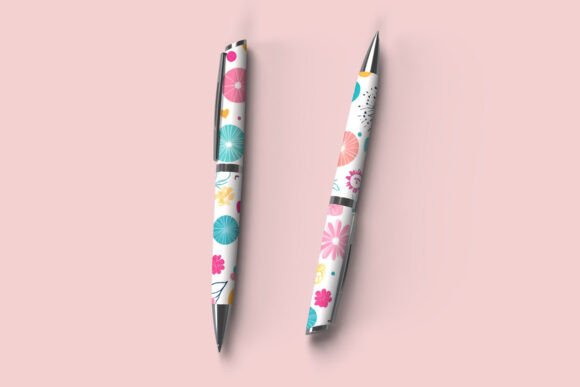
At its most basic level, a Pen Wrap Mockup is a pre-built, layered template, typically structured as a Photoshop smart object, that allows you to map flat artwork onto a three-dimensional rendering of a pen. But its true value lies in its ability to simulate the physical constraints of the print medium. The wrap section corresponds to a specific area of the barrel. The resolution must match a standard print output. The lighting and shadows interact with the curvature of the cylinder, revealing how a design will look in real-world lighting conditions.
For the practical user, a high-quality mockup serves as a verification layer. Before you commit to a minimum order quantity with a supplier, the mockup asks critical questions: Does the artwork align correctly around the seam? Is the text legible when wrapped over the metal or plastic contour? Does the color of the ink or wrap material harmonize with the pen body itself? Addressing these questions in the digital mockup stage prevents costly reprints and ensures that the final product meets the expectations set during the pitch.
This shifts the mockup from a marketing gimmick into a pre-production validation tool. It sits at the intersection of design intent and physical manufacturing, bridging the gap between what looks good on a monitor and what works in a client’s hand.
Strategic Integration Across the Project Lifecycle
To maximize the return on time invested, consider how the Pen Wrap Mockup resource interacts with different phases of your workflow. Its utility extends far beyond a single project milestone.
Front-Loading for Stakeholder Buy-In
In the early stages of a project, whether you are pitching a corporate gift concept to a procurement manager or presenting a limited-edition series to a brand director, clarity is the strongest currency. Flat logo files and verbal descriptions leave room for interpretation, which often leads to scope creep and revisions. Presenting a configured Pen Wrap Mockup at the proposal stage does two things. First, it anchors expectations by showing exactly how the final product will appear. Second, it accelerates decision-making by providing a concrete visualization that stakeholders can approve or modify immediately. This front-loading of visual proof reduces the back-and-forth that typically bogs down the initial approval process.
Iterative Design Refinement
Once a concept is greenlit, the mockup becomes your primary workspace for fine-tuning. This is where the design workflow efficiency of a well-constructed PSD shines. Because the mockup is layered, you can rapidly swap colorways, test different pattern scales, or adjust the placement of a logo relative to the pen clip. This iterative cycle is best conducted within the mockup environment itself, rather than flat, because the curvature of the barrel alters the visual weight of certain elements.
- Testing Scalability: A pattern that looks balanced on a flat canvas can feel dense or sparse when wrapped around a pen. The mockup provides immediate visual feedback on scale and repeat.
- Secondary Brand Elements: If the pen includes a secondary color on the grip or trim, the mockup helps you evaluate how these accents interact with the main wrap design.
- Typography Legibility: Wrapping text around a cylinder introduces optical distortion. A mockup reveals readability issues that would be invisible in a standard design file.
Post-Project Asset Repurposing
The work should not stop once the order is placed. A finished Pen Wrap Mockup file is a valuable marketing asset. The same photorealistic render you used for client approval can be repurposed for a product launch on social media, an email newsletter announcement, or a line sheet for a trade show booth. By setting up your mockup file with a clean background and appropriate resolution from the start, you create a reusable visual asset library. This consistency across your sales and marketing collateral reinforces brand professionalism without requiring a separate photoshoot.
Interfacing with Your Broader Toolset
The mockup does not exist in isolation. Its effectiveness depends on how well it communicates with your design software, your print vendor, and your internal review processes.
Software Compatibility: Most high-end Pen Wrap Mockups are built for Adobe Photoshop and rely on Smart Object layers. Understanding how to navigate these layers without breaking the embedded scaling or lighting effects is essential. If you work extensively in vector software like Adobe Illustrator, you will likely need to rasterize your wrap art or use linked smart objects to maintain fidelity. Establishing a clear file import routine, such as always using a specific artboard size and color profile, prevents compatibility headaches.
Vendor Specifications: A mockup is a simulation, not a production template. It is crucial to cross-reference the dimensions and resolution of your mockup file with your actual print provider. Some mockups use idealized aspect ratios that may not match real-world pen sizes. By aligning the mockup parameters with your vendor’s exact specifications (wrap length, bleed requirements, DPI), you ensure that the beautiful design you sign off on is physically achievable. This step is a fundamental part of quality control that separates experienced production designers from novices.
Client Collaboration Loops: The mockup facilitates a more efficient feedback loop. Instead of using vague annotations on flat PDFs, you can send a low-resolution JPG of the mockup render and ask specific questions about the design placement. Getting a client to say “move the logo three millimeters to the left” on a mockup is far easier than correcting it after production. Setting up a shared folder or using proofing software where these mockup renders can be reviewed and versioned saves significant time.
Practical Implementation for Long-Term Use
Getting the most out of a Pen Wrap Mockup requires some upfront organization. A collection of random PSD files scattered across folders defeats the purpose of an efficient system.
Building a Curated Mockup Library
Invest time in curating a small set of reliable, high-quality pen mockups that cover your most common use cases: a standard plastic ballpoint, a metal rollerball for premium gifts, and perhaps a promotional stylus or highlighter. Having a focused library of three to five well-structured templates is more effective than having fifty low-quality files. For each template, standardize the naming convention, folder structure, and color profile. This turns your mockup collection into a repeatable system rather than a random resource.
Pre-Set Actions and Templates
If you frequently produce pen wrap designs, create a batch action in Photoshop that performs the initial file setup. Automate the steps of opening the mockup, creating a new smart object layer, and setting the resolution to 300 DPI. This eliminates repetitive clicks and reduces the chance of a technical error during the file import process.
Maintaining Visual Consistency
When presenting multiple design concepts to a client, it is vital to use the same mockup angle and lighting. Using different mockups for different variations introduces an uncontrolled variable that can skew the client’s perception. The lighting in one mockup might make a color look warmer, while another might dull it. Standardizing on a single, neutral mockup for direct comparisons ensures that feedback is based on the design itself, not the presentation environment. This disciplined approach to presentation consistency builds trust and clarifies communication.
Observations on Efficiency and Preparation
From a project management perspective, the Pen Wrap Mockup serves as a final checkpoint before committing resources to manufacturing. It is an opportunity to catch errors that are expensive to fix in physical production. An hour spent meticulously adjusting the wrap alignment on a mockup can translate directly into savings on setup fees, material waste, and shipping costs for corrected goods.
Preparation is key. Before importing your artwork, ensure that your design file is properly sized and spaced according to the mockup’s smart object dimensions. A mismatch here leads to stretching or cropping that defeats the purpose of the validation. Always use high-resolution source imagery, as the mockup will render details sharply, exposing pixelation that might not be obvious at 100% zoom on a flat document.
Usability considerations extend to how you package and share your mockup output. For internal reviews, a high-res PNG is standard. For client presentations, consider embedding the mockup render into a broader brand guideline PDF or a presentation slide. This contextualizes the pen within a larger brand ecosystem, which adds perceived value to the project.
Future-Proofing Your Workflow
As printing techniques evolve, incorporating elements like spot UV coatings, metallic foils, or textured finishes, the role of the mockup becomes even more nuanced. While a standard raster mockup cannot perfectly simulate a foil reflection, advanced mockup creators are developing layer structures that allow for realistic gloss mapping and texture overlays. Staying informed about these developments and upgrading your mockup templates accordingly ensures that your pre-visualization remains accurate.
For the professional who treats design as a repeatable process rather than a one-off event, the Pen Wrap Mockup is not merely an aesthetic nicety. It is a strategic interface between concept and reality. It enforces a discipline of visual precision, streamlines the approval chain, and protects the integrity of the brand once that pen reaches the end user. By embedding this tool thoughtfully into your workflow, you turn a simple rendering into a powerful mechanism for planning, validation, and consistency.